Tools for trader I: World clock on your desktop

If you are trading Forex like me, you should have some experience searching of world clock or time zone on Google. What is the time in London now? Has Japanese market closed now at Melbourne time 3pm? Forex is a 24-hour market, and volatility moves along with major market sessions. So, it is handy to have a world clock sitting on your desktop.

I have been using Qlock World clock since I started trading Forex and Futures. Living in Asia, and now Australia, I need to be aware which market is opened when establishing position.

Qlock World clock allows you to set up individual clock for each city of your choice, and even setup alarm. (So, not only for trader, you can use it to make sure you ring your love ones to say 'Good morning, darling' at the right time :-) ). Here is the snapshot of my desktop.
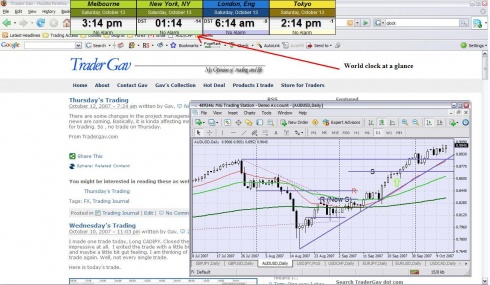
There are free and paid versions of Qlock World clock. With only $14.95, the professional version comes with Integrated RSS feed reader, Daily FX rates, Sticky notes, Automatic program updates, Multiple desktop profiles etc. Check it out.


Comments

Historical comments are preserved here. New comments are closed.

  1. StockKevin
    That clock is awesome!
  2. StockKevin
    That clock is awesome!
  3. Juergen
    I agree - it's on my desktop now. Thank you!
  4. Juergen
    I agree - it's on my desktop now. Thank you!
  5. Gav
    Kevin/Juergen, Glad to know the tool is useful for you guys! Have a good trading week ahead.
  6. Gav
    Kevin/Juergen, Glad to know the tool is useful for you guys! Have a good trading week ahead.
  7. Bill Henner
    Gav, Thanks for the info on the clock. I will share this (and a link to your blog) with all my trading clients. Bill Henner
    1. Gav
      Bill, Glad to know it is useful to your clients. Have a good day. Cheers!
  8. Bill Henner
    Gav, Thanks for the info on the clock. I will share this (and a link to your blog) with all my trading clients. Bill Henner
    1. Gav
      Bill, Glad to know it is useful to your clients. Have a good day. Cheers!
  9. Yinac
    Thanks for your sharing this good looking clock.
    1. Gav
      Yinac, Cheers! :-)
  10. Link Love Friday | A Trade A Day — Pingback
    [...] Gav pointed me in the direction of a very cool trader tool. Especially for forex [...]
  11. Afraid to Trade.com Blog - Overcoming Stock Market Fears » Links to Start the Week — Pingback
    [...] Gav:  “Tools for the Trader:  A World Clock on your Desktop” Helpful if you trade FOREX or certain electronic futures [...]
  12. Weekend Reading - October 28, 2007 | My Adventures into The Street — Pingback
    [...] Gav describes why you need a world clock for Forex [...]
  13. jen
    This is a good tool. Thanks!
  14. jen
    This is a good tool. Thanks!
  15. akshay
    It's fascinating and awesome, it could be very helpful in forex trading, i will surely suggest it to my friends, as first i shall check out the free paid version. Thanks
  16. akshay
    It's fascinating and awesome, it could be very helpful in forex trading, i will surely suggest it to my friends, as first i shall check out the free paid version. Thanks
  17. Yinac
    Thanks for your sharing this good looking clock.
    1. Gav
      Yinac, Cheers! :-)